The business problem: Sales and Service working from different pictures
In many organizations, Sales and Service share the same customers but not the same view of them. Account executives work in opportunities and pipeline reviews. Support teams work in Cases and queues. An escalation can be well known in the service organization and still not reach the people having commercial conversations with the same account.
That gap matters most at sensitive moments: renewals, expansions, pricing discussions, and executive meetings. A seller who proposes more licenses while the customer is waiting on an escalated issue can appear uninformed or indifferent. The commercial conversation becomes harder, and the customer may question whether the two sides of your company talk to each other.
Historically, closing that gap depended on habits: checking related lists before a call, a support manager remembering to send a note, or a weekly account review. Those habits are useful but inconsistent, and they rarely scale.
What changed in Winter ’27
Salesforce’s Winter ’27 release adds Salesforce Sales Workspace escalated cases as a native signal. In Salesforce’s words, reps get a prioritized alert when an open, escalated Case is tied to an important opportunity or a bookmarked account.
- Where it appears: in the All Signals section of the Sales Workspace page, alongside the seller’s other signals.
- Review: opens the Case record so the seller can see its status, owner, and history.
- Post in Slack: shares the signal in Slack without leaving Sales Workspace. This requires the Slack-to-Case integration and Slack access for the user. Without them, sellers use Review.
What the signal does and doesn’t do
This is an out-of-the-box signal. It doesn’t require a configured AI agent, and it doesn’t change, reassign, or resolve the Case. It makes the issue visible to the seller, and the people involved still decide how to respond.
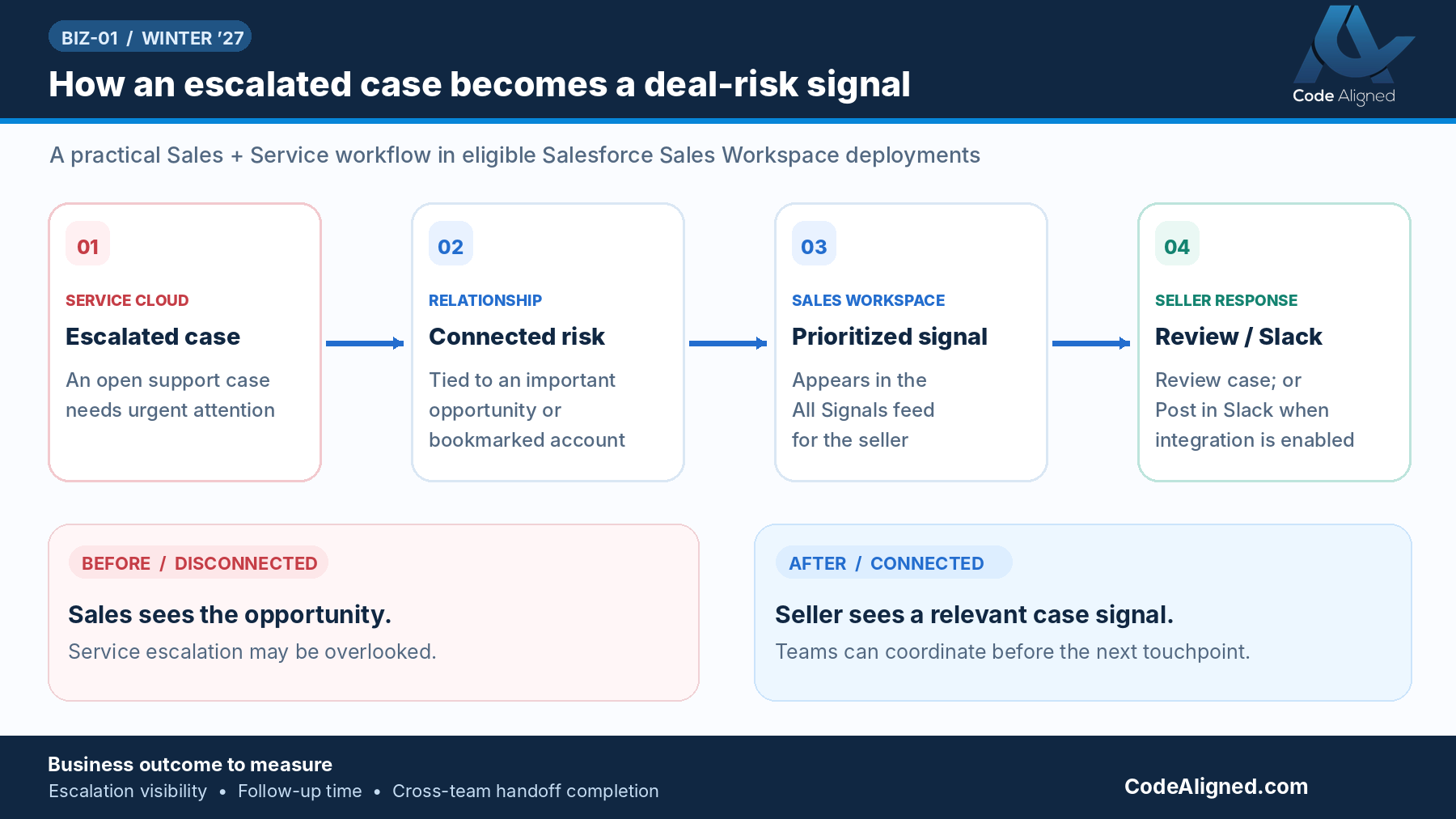
Before vs after: from chance discovery to a prioritized signal
The feature doesn’t replace good account management. It changes how a seller finds out about an escalation.
| Moment | Disconnected process | With the Winter ’27 signal |
|---|---|---|
| Discovery | Seller hears about the escalation from a colleague, by chance, or from the customer | An open, escalated Case on a qualifying record appears in All Signals |
| Context | Seller searches records or asks support for status | Review opens the Case record directly |
| Coordination | Ad hoc email or chat with whoever might know | Post in Slack when the Slack-to-Case integration is set up; otherwise the seller contacts the Case owner through your usual channels |
| Customer conversation | Risk of proposing commercial terms without acknowledging the issue | Seller can prepare with current Case status and an agreed message |
| Resolution | Owned by Service | Still owned by Service. The signal doesn’t resolve Cases. |
A business example
This is a hypothetical example written to illustrate the workflow. It isn’t a Code Aligned client story and doesn’t describe measured results.
A B2B software company has an open expansion opportunity with an existing customer for additional user licenses and a new module. The account executive has bookmarked the account ahead of a proposal meeting next week.
Three days earlier, the customer’s operations team reported a recurring data-sync failure. The support team escalated the Case after a missed target, and an engineer is investigating.
- The seller sees the risk. Because the escalated Case is open and tied to a bookmarked account, it appears in All Signals in the seller’s Sales Workspace.
- The seller reviews the Case. Review opens the Case record, showing the issue, its status, and who owns it.
- The seller coordinates with Support. If the org has the Slack-to-Case integration, the seller can Post in Slack to bring in the Case team. If not, they contact the Case owner directly. Together they agree on what can be said about status and next steps.
- The seller prepares the conversation. The account executive opens the meeting by acknowledging the issue and sharing the agreed update. They decide with their manager whether to present the expansion now or follow up after resolution, and record that decision as a next step on the opportunity.
The signal didn’t fix the sync failure, and it doesn’t guarantee the deal. It gave the seller the context to walk in prepared rather than surprised.
Implementation guidance
Before you announce the feature to sellers, confirm each of the following. For exact setup steps, follow the Winter ’27 release note and Salesforce’s Sales Workspace setup documentation for your org.
| Area | What to confirm |
|---|---|
| Edition | Lightning Experience in Enterprise, Unlimited, or Agentforce 1 Sales edition |
| Add-on | The Sales Foundation add-on is in place |
| Sales Workspace | Sales Workspace is set up and available to the sellers in your pilot, and they know where All Signals appears |
| Data 360 | The Data 360 provisioning and configuration that your Sales Workspace setup depends on is complete. Review any consumption implications with your Salesforce account team. |
| Case relationships | Cases are consistently related to the correct customer Account, and escalations are recorded on the Case in Salesforce, not only in email or chat |
| User permissions | Sellers have Sales Workspace access and read access to the related Case records |
| Slack (optional) | For Post in Slack: the Slack-to-Case integration is set up and users have Slack access. Without them, Review opens the Case record. |
Data quality is usually the deciding factor. If Cases aren’t linked to the right accounts, or escalations live outside Salesforce, the signal has nothing reliable to surface.
Business value
The value is practical rather than dramatic, and it depends on your processes and adoption:
- Earlier awareness: sellers can learn about escalations from a prioritized signal instead of by chance or from the customer.
- More informed account management: renewal, expansion, and executive conversations can account for current support issues.
- Better collaboration: Sales and Service work from the same Case record, and from Slack where configured, so they can coordinate on one customer message.
We don’t attach ROI figures or revenue claims to this feature. The honest way to judge its value is to measure it in your own org.
Measuring a 30-day pilot
Start with one sales team and the support queue that serves their accounts. Capture a baseline from recent escalations, then track these measures for 30 days:
- Escalation awareness time: from Case escalation to the seller’s first documented acknowledgment
- Coordination time: from awareness to documented contact with the Case owner or Case team
- Documented follow-up: share of signals with a recorded next step on the opportunity or account
- Seller feedback: a short survey on signal relevance, noise, and usefulness before customer conversations
At the end of the pilot, review the results with Sales, Service, and RevOps before rolling out more widely. Look at data-quality gaps and Slack coordination as well as the numbers.
Frequently asked questions
Do we need Agentforce or a configured AI agent to use this feature?
No configured AI agent is required. The escalated-case signal is an out-of-the-box Sales Workspace signal. Your org does need an eligible edition (Enterprise, Unlimited, or Agentforce 1 Sales) with the Sales Foundation add-on, plus a working Sales Workspace setup.
Is Slack mandatory?
No. Slack is optional. The Post in Slack action is available only when the Slack-to-Case integration is set up and the user has Slack access.
What happens if we do not use Slack?
Sellers still see the signal in Sales Workspace. Choosing Review opens the Case record in Salesforce, where they can check its status, owner, and history before coordinating with the support team through your usual channels.
Does the feature automatically resolve support Cases?
No. The signal makes an open, escalated Case visible to the seller. It does not change, reassign, or resolve the Case. Resolution stays with your service team and processes.
Which Cases appear as signals?
According to the Winter ’27 release notes, an open, escalated Case tied to an important opportunity or a bookmarked account. Cases that are closed, not escalated, or not connected to those records are not described as qualifying.
Sources
Feature behavior and requirements in this article are based on Salesforce’s official Winter ’27 documentation. Check the current version before you roll out.