Why repetitive manual tasks slow business growth
Manual work rarely looks expensive in isolation. A rep copies a new lead into a spreadsheet, a coordinator re-types order details into accounting, a manager chases an approval by email. Each task takes minutes; multiplied across a team and a quarter, it becomes one of the largest hidden costs in the business.
The deeper problem is not time—it is inconsistency and latency. Manual follow-up depends on memory, so response times vary by person and by day. Hand-keyed data introduces errors that surface weeks later as reconciliation headaches. Approvals stall in inboxes while customers wait. Growth amplifies all of it: every new rep, region, and product line multiplies the number of handoffs that can be forgotten, delayed, or done differently.
CRM workflow automation addresses this at the system level. Instead of asking people to remember the process, the platform executes it—consistently, instantly, and with a record of every action.
What Salesforce automation actually means
“Salesforce automation” is an umbrella term, and the ambiguity causes confusion in scoping conversations. In practice it covers four layers:
- Record-triggered automation — logic that runs when a record is created or changed, built primarily with Salesforce Flow or Apex triggers.
- Approval processes — structured routing of records for sign-off, with defined approvers, criteria, and escalation paths.
- Workflow automation — task creation, field updates, email alerts, and notifications that keep work moving between people.
- Integration-driven automation — events and API calls that connect Salesforce activity to ERP, marketing, support, and finance systems.
Salesforce process automation is not about removing people from decisions. It is about removing the repetitive mechanics around decisions, so your team spends its judgment where judgment actually matters.
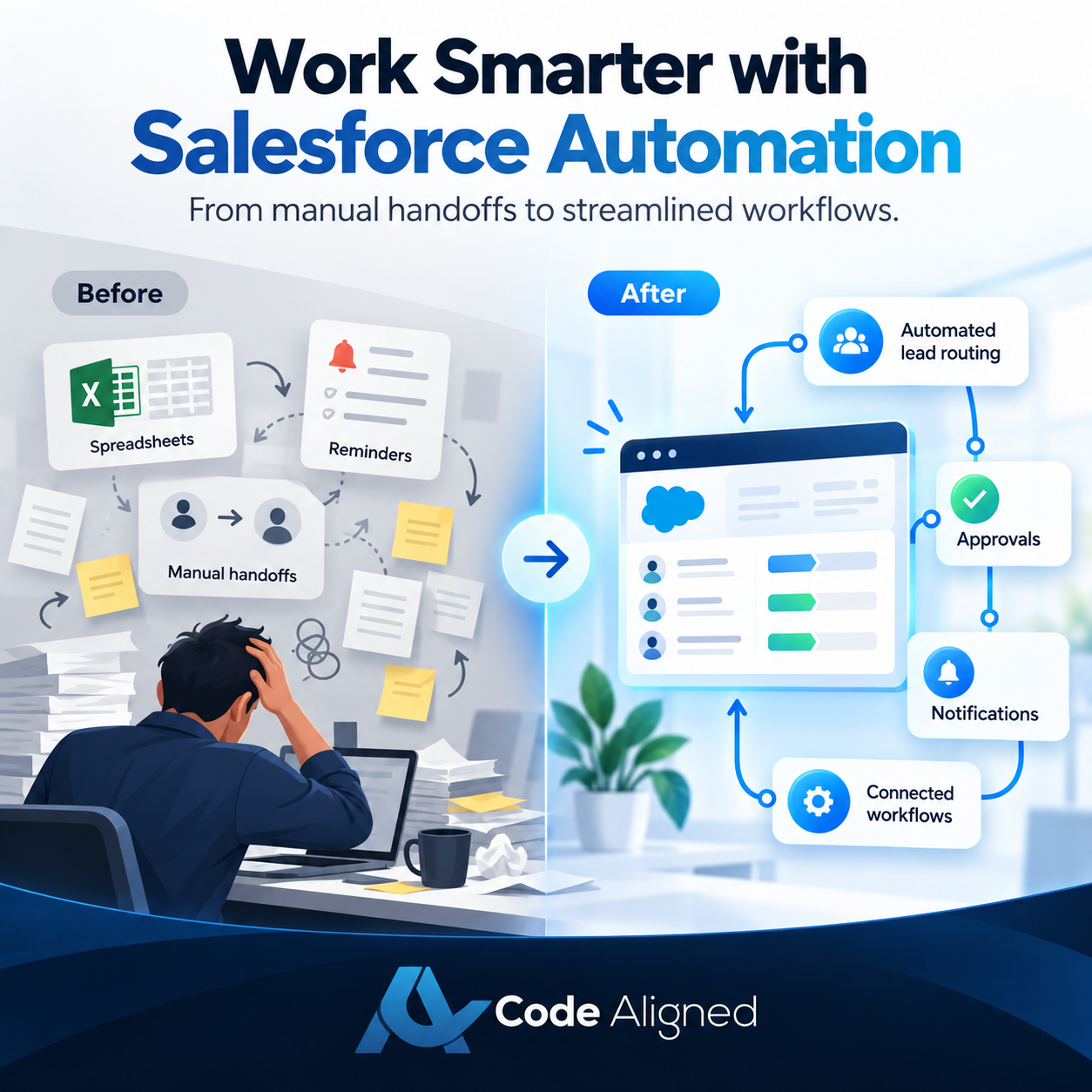
Before and after automation
The shift is easiest to see side by side. These are representative scenarios, not promised outcomes—your results depend on process design and adoption.
Before automation
- A web lead sits in an inbox until someone assigns it—sometimes hours, sometimes days.
- Reps create follow-up tasks manually; quotes go stale when reminders are forgotten.
- Managers learn about stuck deals in the weekly pipeline meeting, after momentum is lost.
- Discount requests are chased over email, with no record of who approved what.
- Won deals are re-keyed into finance systems, introducing transcription errors.
After automation
- New leads are scored, routed to the right rep by territory rules, and a follow-up task is created instantly.
- Opportunity stage changes trigger reminders, notifications, and next-step tasks automatically.
- Deals idle beyond a threshold surface on a dashboard and alert the owner’s manager.
- Discounts route through a formal approval with a complete, auditable decision trail.
- A closed-won opportunity hands structured data to finance through a governed integration.
Six automation use cases that deliver value early
These are the areas where most organizations see the fastest, most dependable gains from CRM workflow automation.
1. Lead assignment & follow-up
Route inbound leads by territory, product interest, or deal size the moment they arrive. Auto-create follow-up tasks and escalation alerts when a lead sits untouched beyond your response-time target—so no inquiry waits on someone’s inbox.
2. Opportunity updates & notifications
When an opportunity changes stage, value, or close date, notify the right people automatically. Flag deals that stall past a defined age, alert managers to large discounts, and keep forecasts honest without manual chasing.
3. Case routing & escalation
Assign service cases to the right queue by product, priority, or customer tier. Escalate automatically when a case approaches its response target unaddressed, and keep the customer informed with triggered status updates.
4. Approvals & operational workflows
Replace email-chased sign-offs with structured approval processes: discount thresholds, contract terms, credit checks, onboarding steps. Every decision is routed to the right approver, time-stamped, and auditable.
5. Integration-driven automation
Let events in one system drive action in another: a closed-won deal creates a sales order in ERP, a shipment updates the customer’s record, a support ticket in an external tool opens a case. This is where Salesforce automation compounds across the stack.
6. Data quality & maintenance
Standardize picklists, enforce required fields at the right stage, flag duplicates, and archive stale records on a schedule. Clean data is the foundation every other automation—and every report—depends on.
What an automation looks like in practice
Every Salesforce automation follows the same skeleton: a trigger, criteria that decide whether to act, the actions themselves, and a logging or notification step that keeps the system accountable.
The pattern scales from a simple lead router to a multi-step, cross-system process. The discipline—clear trigger, explicit criteria, defined actions, visible logging—stays the same.
Salesforce Flow vs. Apex: choosing the right approach
Most automation decisions come down to a practical question: declarative Flow or programmatic Apex? Neither is universally better; the right choice depends on complexity, volume, and who will maintain the solution.
| Consideration | Salesforce Flow | Salesforce Apex |
|---|---|---|
| Build & maintenance | Point-and-click; admins and consultants can build and adjust | Code-based; requires a developer to write and maintain |
| Best-fit complexity | Record updates, task creation, routing, guided screens, straightforward logic | Complex transactions, recursion control, advanced calculations, composite operations |
| Bulk & performance | Capable but can hit governor limits on heavy bulk operations if not designed carefully | Fine-grained control over bulkification and transaction boundaries |
| Testing | Flow tests and manual verification | Formal unit tests with enforced code coverage for deployment |
| Integration | External services and platform events for many common cases | Full API control, callouts, complex authentication and retry logic |
| Typical role | Admin / consultant-led | Developer-led |
A mature org usually blends both: Flow handles the bulk of business-process automation where transparency and maintainability matter, while Apex covers the cases that demand precise control. Choosing Salesforce Apex automation for everything is as costly as forcing complex logic into Flow.
Risks and best practices
Automation fails quietly when it is treated as a series of isolated quick wins. These practices keep it dependable:
- Error handling — decide what happens when an automation fails: who is notified, what is logged, and how the record is recovered. A silent failure is worse than no automation.
- Bulk processing — design for 200 records at once, not one. Automation that works in a sandbox test can hit governor limits during a data import or integration sync.
- Monitoring — make automation observable. Flow interviews, Apex logs, and failure alerts should surface problems before users do.
- Maintainability — name automation clearly, document what it does and why, and review what already exists on an object before adding more. Accumulated, undocumented automation is how orgs become fragile.
- Recursion & ordering — automation that updates records can re-trigger itself or fire in unexpected order. Control re-entry and know the order of execution on your most automated objects.
How to identify which processes to automate first
Score candidate processes against these questions. The best early candidates score well across all of them:
- Is the process high-volume and repetitive?
- Are the rules stable and clearly understood?
- Does manual handling cause frequent errors?
- Does delay in this process stall downstream work?
- Is the data it touches clean and structured?
- Can a clear owner maintain the automation after launch?
Automate the stable, high-volume, rule-based process first. Resist the urge to start with the most complex exception-heavy workflow—prove the discipline on a dependable win, then expand.
How Code Aligned approaches custom Salesforce automation
We begin with the process, not the tool. An engagement starts by mapping the workflow as it actually runs—volume, exceptions, systems touched, and the cost of delay—then deciding what should be automated with Salesforce Flow, what warrants Apex, and what should stay manual.
From there we design for bulk safety, build with clear naming and documentation, test with realistic data volumes, and put error handling and monitoring in place before go-live. We train the admins who will own the automation, and we stay engaged through managed services as your processes evolve. We serve businesses across the USA, UAE, and UK.
Explore our Salesforce services, our agentic automation capabilities, or our Salesforce consulting expertise—or start a conversation about your processes.
Frequently asked questions
What is the difference between Salesforce Flow and Apex?
Flow is a declarative, point-and-click automation tool that admins and consultants can build and maintain without code. Apex is the Salesforce programming language, used when automation needs complex logic, high-volume processing, or performance that declarative tools cannot reliably deliver. Many organizations use both together.
Which business processes should we automate first?
Start with processes that are high-volume, rule-based, and error-prone when done manually: lead assignment, follow-up task creation, approval routing, and status-change notifications. Automate the stable, well-understood process before the complex exception-heavy one.
Can Salesforce automation connect with our ERP and other external systems?
Yes. Salesforce supports event- and API-driven integration, so automation can react to or trigger activity in ERP, accounting, marketing, and support platforms. Integration automation should include error handling, retries, and monitoring so failures surface instead of silently corrupting data.
What are the risks of automating too much in Salesforce?
Over-automation creates hard-to-maintain logic, governor-limit failures under bulk data loads, and errors that users cannot diagnose. Mitigate this with clear naming, documentation, bulk-safe design, error logging, and a review step before adding new automation to an object.
Do we need a developer for Salesforce automation, or can an admin handle it?
Many automations are achievable declaratively by an experienced admin using Flow. A developer becomes important when you need complex transactions, advanced integrations, or rigorous unit testing. A blended approach—Flow where it fits, Apex where it is warranted—keeps solutions maintainable.