Why growing businesses outgrow basic CRM systems
Few businesses notice the exact moment their CRM stops fitting. The system that organized a five-person sales team becomes a quiet bottleneck for a fifty-person organization. Contacts still get entered and deals still get closed, but every new region, product line, and team stretches a tool that was chosen for a smaller, simpler operation.
Basic CRMs are genuinely good at storing contacts and tracking straightforward deals. What they are not designed for is governed, shared customer data, multi-team automation, or deep integration with finance and operations. The five signs below help CEOs, CTOs, sales directors, and operations managers recognize when the constraint is the system—not the team—and plan a deliberate next step instead of an emergency replacement.
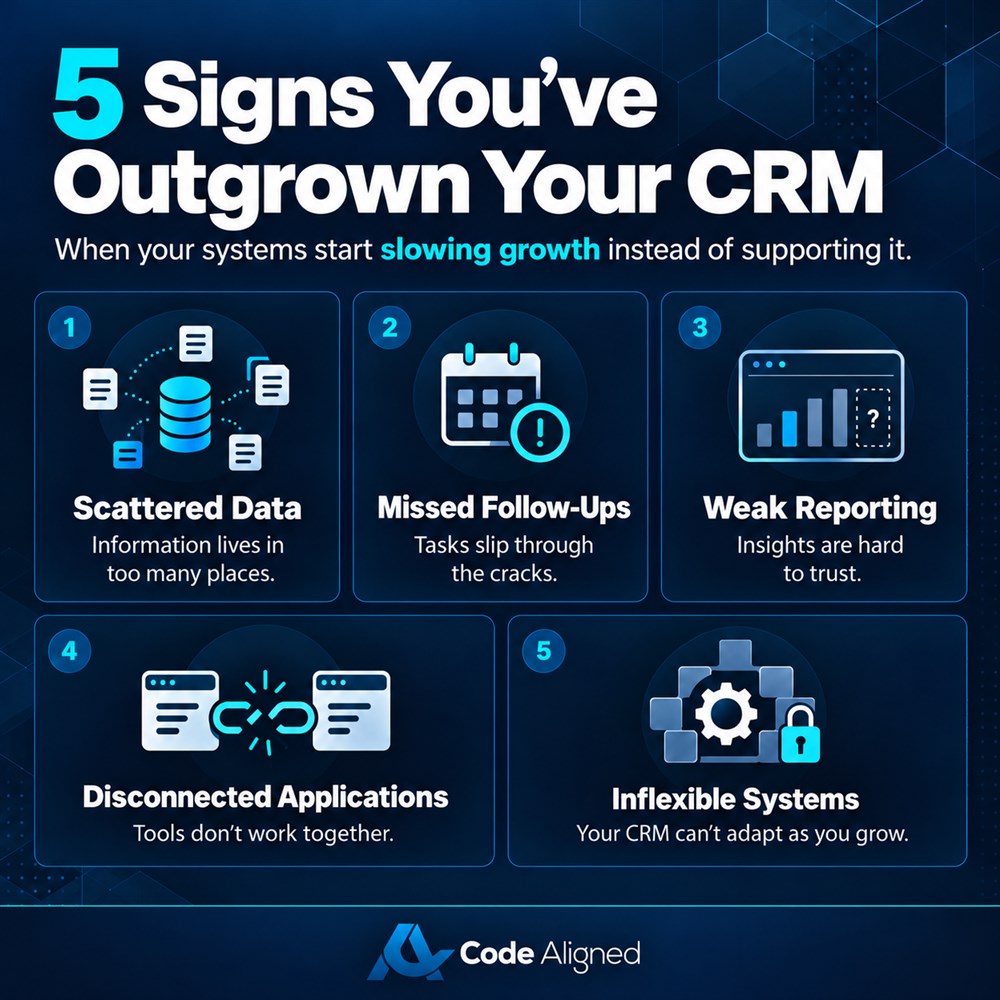
Customer data is scattered across multiple platforms
When account details live in the CRM, conversations sit in personal inboxes, invoices live in accounting software, and key contacts hide in individual spreadsheets, the CRM is no longer your system of record. Nobody can see the full customer relationship in one place.
The symptoms are easy to spot: duplicate records with conflicting phone numbers, service staff asking customers to repeat their history, and new sales hires needing weeks to reconstruct relationships from a predecessor’s inbox. Reporting becomes an exercise in reconciliation rather than insight. A scalable CRM consolidates accounts, contacts, activities, and transactions into a single governed record, so every team works from the same truth—and a future CRM migration starts from clean, owned data instead of scattered files.
Sales teams rely heavily on manual follow-ups
Healthy sales teams sell; struggling ones administer. If your reps set reminders in personal calendars, copy follow-up lists into spreadsheets, or rely on memory to re-contact a prospect, the CRM is failing at its most valuable job: making the next action obvious.
Manual follow-up does not scale. Lead response time depends on who is having a good day, quotes go stale because nobody was reminded, and prospects who asked to be contacted next quarter are quietly forgotten. Managers cannot enforce a cadence they cannot see. Modern CRM platforms automate assignment, task creation, follow-up sequences, and stage-based reminders, so discipline comes from the system rather than individual heroics.
Management lacks real-time pipeline visibility
Ask a simple question: how many deals slipped this week, and why? If the honest answer requires building a spreadsheet before the pipeline meeting, your CRM is not giving leadership real-time visibility.
The pattern is familiar. Forecasts are assembled manually hours before review meetings, pipeline stages mean different things to different reps, and end-of-quarter surprises become routine. Hiring and inventory decisions get made on numbers nobody fully trusts. A scalable CRM defines stages once, records every change, and turns live data into dashboards—conversion by stage, deal velocity, aging opportunities, and forecasts that update themselves. Leadership stops requesting reports and starts interrogating reality.
The CRM does not integrate effectively with business applications
A CRM that cannot talk to the rest of your stack forces people to become the integration. Staff re-key won deals into accounting, marketing cannot see which campaigns produce revenue, and support agents open three systems to answer one question.
Every manual handoff adds delay, errors, and cost—and the bill grows with each new tool you adopt. This is where CRM scalability becomes an operational issue rather than an IT preference: the platform must exchange data reliably with ERP, finance, marketing automation, ecommerce, and support systems. Evaluate whether your CRM offers governed APIs, proven connectors, and monitoring for failed synchronizations. Integration should be designed with clear data ownership, not improvised with exports and imports.
Existing CRM customization and scalability are limited
Every business develops processes that make it distinct: an approval step, a pricing rule, an onboarding checklist, a compliance requirement. If your CRM cannot model a custom object, add the fields you need, or automate a workflow without an upgrade tier that still falls short, you are renting someone else’s idea of your process.
The workarounds that follow—shadow spreadsheets, side databases, documentation nobody maintains—become fragile infrastructure. License and performance limits compound the problem when adding users, data, or a second region feels punitive. A scalable platform lets you configure objects, fields, automation, and permissions as the business evolves, so the system grows with you instead of against you.
The business cost of continuing with an unsuitable CRM
Each sign is tolerable on its own, which is exactly why businesses live with them too long. Together they compound. Slow follow-up loses winnable deals. Poor handoffs erode customer trust. Unreliable data produces confident decisions built on bad numbers, and every workaround increases dependence on the individuals who built it.
There is also an adoption spiral: when the CRM makes work harder, people route around it, which makes the data worse, which gives everyone even less reason to use it. The real cost is not only operational drag—it is the opportunities you never see, because the pipeline was never truly visible.
Basic CRM vs. scalable CRM: a practical comparison
The differences that matter most are operational, not cosmetic. This table summarizes what typically separates an entry-level tool from a platform built for growth.
| Capability | Basic CRM | Scalable CRM |
|---|---|---|
| Customer data | Contacts and simple deal records | One governed record shared by every team |
| Follow-ups | Manual reminders and personal notes | Automated tasks, sequences, and lead routing |
| Reporting | Exports assembled in spreadsheets | Real-time dashboards and self-updating forecasts |
| Integrations | Limited connectors or CSV imports | Governed APIs linking ERP, marketing, and support |
| Customization | Fixed fields and rigid workflows | Configurable objects, automation, and permissions |
| Scalability | User, data, and feature ceilings | Grows across teams, regions, and product lines |
When Salesforce may be an appropriate CRM solution
Where Salesforce fits well
Salesforce is a reasonable candidate when several of these signs appear together: multiple teams need shared customer context, automation must span sales and service, integrations reach finance and operations, and leadership needs governed, real-time reporting. Its configurability, partner ecosystem, and CRM scalability suit organizations that expect the platform to last through several stages of growth.
Tradeoffs and costs to plan for
The tradeoffs are real. Licensing is subscription-based, typically priced per user per month, and total cost varies with edition, products, and user count. Implementation takes genuine effort—data migration, process design, security, and training—and the platform rewards having an administrator or partner maintaining it. For teams with simple contact-tracking needs, a lighter CRM is often the more cost-effective answer.
The decision should follow an assessment rather than a sales pitch. A Salesforce CRM consulting partner can map your processes, quantify the cost of the status quo, and recommend whether to configure Salesforce, integrate what you already have, or defer change until the business case is stronger.
A practical checklist for evaluating CRM readiness
Use these questions to assess whether your current CRM still fits. Score each answer honestly:
- Is every customer interaction visible in one system of record?
- Can a new rep see a complete account history on day one?
- Are follow-ups, assignments, and reminders automated?
- Can leadership view a live pipeline without requesting a report?
- Do forecasts update themselves from current deal data?
- Does the CRM integrate with finance, marketing, and support tools?
- Can you add fields, objects, and workflows without workarounds?
- Does the system stay fast as users and data grow?
- Can you enforce data quality, permissions, and audit trails?
- Do teams actually prefer working in the CRM?
If you answered “no” to three or more, a formal CRM assessment will usually pay for itself in clarity—even if the conclusion is to fix processes before platforms.
How Code Aligned can support your next step
Code Aligned provides CRM implementation services across the full lifecycle. A typical engagement begins with an assessment: mapping your processes, data, integrations, and reporting needs, then scoring your current platform against them. If change is justified, we plan and execute the CRM migration—data cleanup, field mapping, test loads, and reconciliation—so your history arrives intact.
Our team then implements and customizes Salesforce around your workflows: pipeline design, automation, integrations with ERP and marketing platforms, dashboards, and role-based training. We serve businesses across the USA, UAE, and UK, and we stay accountable after go-live through managed services and continuous improvement.
Explore our Salesforce services, our broader CRM development capabilities, or our Salesforce CRM consulting expertise—or book a consultation to talk through your situation.
Frequently asked questions
How do we know if we have outgrown our CRM or just need better processes?
Start with the process, not the tool. If the issue is inconsistent usage of a capable system, training and governance may be enough. You have likely outgrown the CRM when core needs—shared data, automation, reporting, integrations—cannot be configured at all.
What does a CRM migration typically involve?
A controlled CRM migration covers data profiling and cleanup, field mapping, deduplication, test loads, and reconciliation before cutover. Integrations, permissions, reports, and automations are rebuilt and validated in the new platform. A phased approach is usually lower risk than a single big-bang switch.
Is Salesforce suitable for small and mid-sized businesses?
Often, yes—but fit depends on complexity more than size. Salesforce suits organizations that need configurable processes, automation, integrations, and room to scale. Teams with simple contact-tracking needs may find a lighter CRM more cost-effective. An assessment helps right-size the decision.
Can Salesforce integrate with our ERP, marketing, and support tools?
Yes. Salesforce provides APIs and an established integration ecosystem for ERP, accounting, marketing automation, support, and ecommerce platforms. Each connection should still be designed with clear data ownership, error handling, and monitoring rather than assumed to work out of the box.
Do we need professional CRM implementation services, or can we implement in-house?
You can implement in-house, but an experienced Salesforce CRM consulting partner reduces risk: process design, data migration, integration architecture, security, and user adoption are easy to underestimate. A good partner also avoids over-customization and trains your team to run the platform confidently.